
Download 8aweek – Productivity, Focus, Distraction Blocker, Time Management, Browser Extension
Overview
8aweek is a productivity-focused tool designed for individuals navigating the increasingly distracting digital landscape. The app aims to reclaim the average eight hours per week lost to non-essential browsing by monitoring online habits and limiting access to distracting websites. Targeted at students, remote workers, and anyone seeking to improve focus during work or study sessions, 8aweek provides a structured approach to digital wellbeing.
Developed by Mozilla, a well-known name in open-source software and web standards, the app carries the credibility associated with a trusted technology provider. Although specific details about the developer’s broader product ecosystem were not provided, Mozilla’s long-standing commitment to user privacy and digital freedom aligns with 8aweek’s purpose. The app functions as a browser extension adapted for mobile use, enabling users to maintain consistent focus across devices.
Real-world use cases include blocking social media during deep work sessions, scheduling time for entertainment sites, and saving links for later access without interruption. In the growing mobile productivity ecosystem, 8aweek fills a niche for users who need a lightweight, privacy-conscious solution to manage their online attention.
Key Features & Functionality
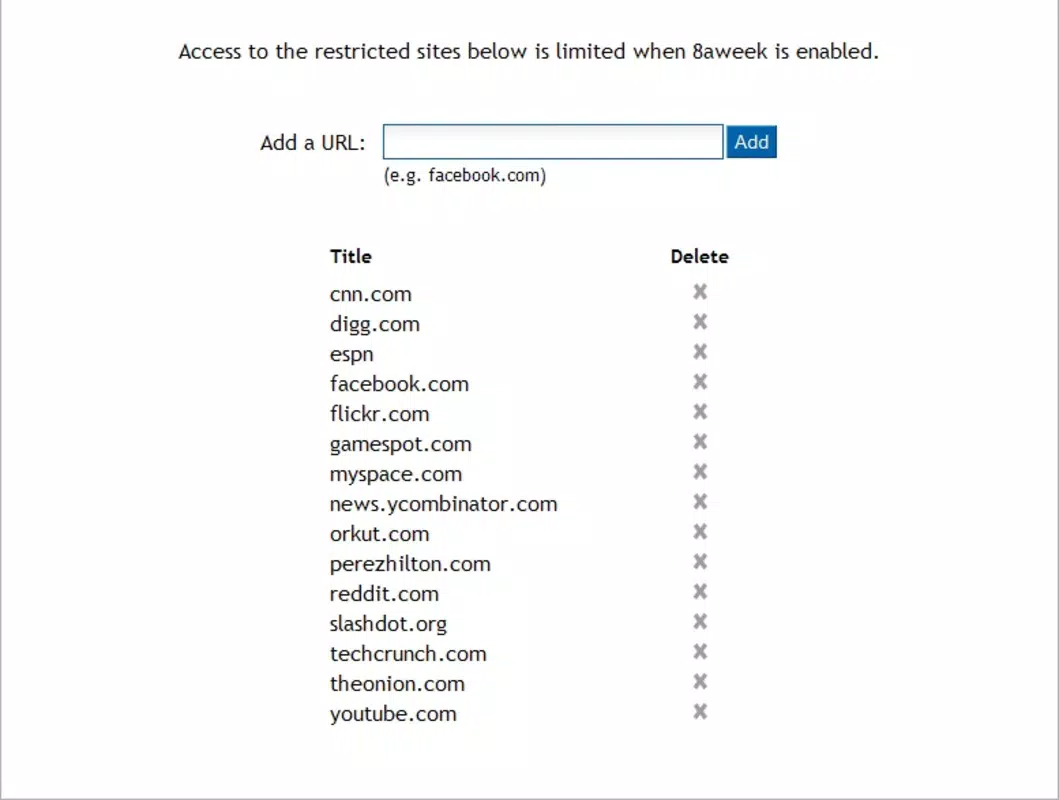
- Distraction Limitation: 8aweek identifies frequently visited websites deemed non-essential and allows users to set time limits on them. This feature helps prevent prolonged, unproductive browsing by enforcing structured access, ideal for maintaining focus during work or study.
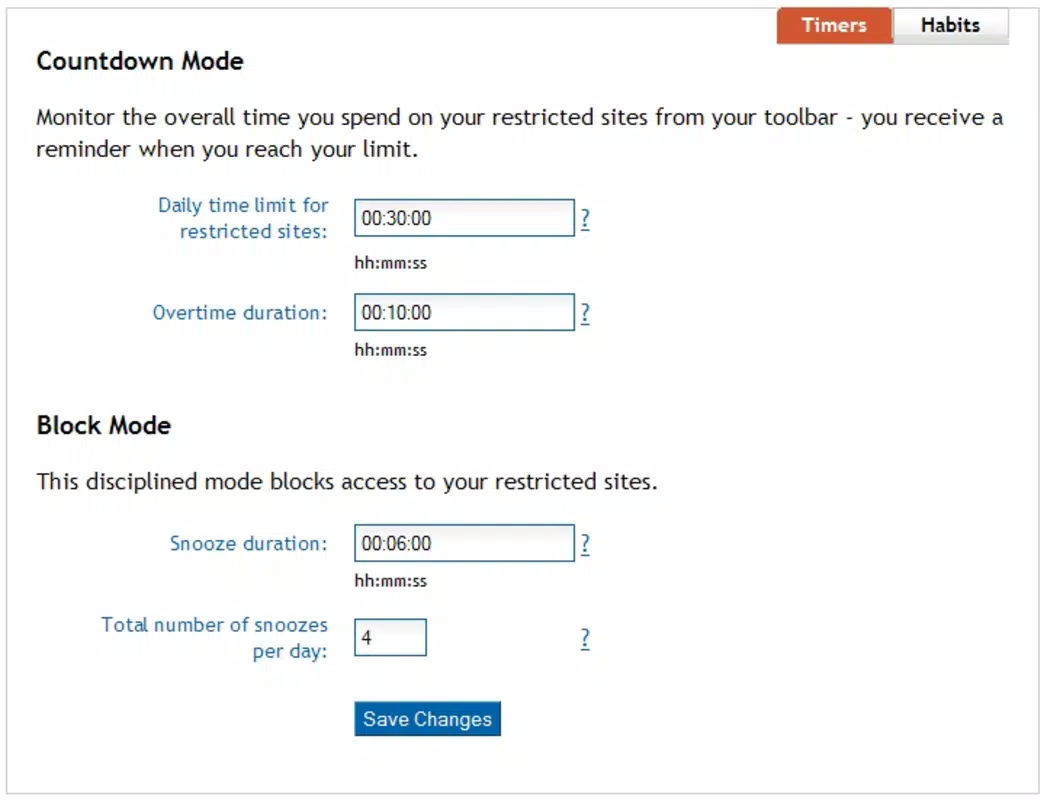
- Customizable Time Settings: Users can define how much time they want to spend on specific sites before automatic blocking occurs. This personalization enables flexible adaptation to individual schedules and changing productivity goals.
- Favorite Site Save: The app allows users to bookmark websites for later access, ensuring important resources aren’t lost during focused sessions. This feature supports a clean, distraction-free workspace while preserving access to valuable content.
- Visual Progress Tracking: 8aweek includes a visual dashboard that displays daily and weekly browsing patterns. This insight helps users reflect on their habits, identify recurring distractions, and make informed adjustments to improve time management.
- User-Friendly Interface: Designed with simplicity in mind, the app offers an intuitive layout with minimal learning curve. Users can easily navigate settings and features without technical expertise, making it accessible to a wide audience.
For example, a student preparing for exams can block social media for two hours daily while saving news sites to review later. Similarly, a remote worker can schedule short breaks for entertainment sites, ensuring productivity isn’t compromised. These features collectively support intentional digital behavior, promoting long-term focus and better time allocation.
Interface, UX & Performance
The interface of 8aweek reflects a clean, minimalist design optimized for usability. Navigation is straightforward, with key functions accessible through a central dashboard. Visual elements such as progress bars and time counters are clearly labeled, enhancing user comprehension.
The app maintains a consistent layout across screens, reducing cognitive load and supporting seamless interaction. Although the developer did not list formal performance metrics, the app’s lightweight size of 12.5 MB suggests efficient resource usage. It is expected to run smoothly on mid-range and high-end Android and iOS devices, though performance may vary depending on system configuration.
Responsiveness appears to be well-managed, with minimal lag during feature transitions. Stability is likely maintained through Mozilla’s development standards, though real-world testing data was not provided. The app does not require excessive permissions, aligning with its privacy-focused intent.
Users can expect consistent behavior across sessions, with settings persisting between restarts. Overall, the user experience prioritizes clarity and efficiency, supporting users in maintaining focus without technical friction.
Platform Compatibility & Technical Requirements
8aweek is available on both Android and iOS platforms, offering cross-device accessibility for users who switch between mobile and desktop environments. The current version is 1.0.2, with a file size of 12.5 MB, indicating a compact and efficient installation. The app is offered free of charge, making it accessible to a broad audience.
Specific requirements such as minimum OS versions or hardware specifications were not disclosed by the developer. The developer did not specify minimum OS requirements or device compatibility tiers. As such, users should verify compatibility with their device’s operating system through official app stores.
While the app’s lightweight nature suggests broad compatibility, exact performance on older or low-memory devices remains unconfirmed. Installation is expected to be straightforward via official app channels, with no reported issues in initial deployment.
Pros and Cons
Pros
- Free to download and use, removing financial barriers to access.
- Developed by Mozilla, a trusted name in digital privacy and open-source innovation.
- Lightweight design with minimal storage footprint (12.5 MB).
- Intuitive interface suitable for users of all technical skill levels.
- Supports customizable time limits and favorite site saving for flexible workflow management.
Cons
- Specific technical requirements were not listed, limiting clarity for potential users.
- Performance on older or low-end devices was not confirmed.
- Real-world user feedback or ratings were not provided for evaluation.
- Functionality may be limited compared to more comprehensive productivity apps.
- Updates and future development plans were not disclosed.
FAQ
Is 8aweek available for both Android and iOS?
Yes, 8aweek is compatible with both Android and iOS platforms, allowing users to maintain consistent focus across mobile devices.
Does 8aweek require a paid subscription?
No, the app is currently free to download and use without any subscription fees.
Can I customize the time limits for different websites?
Yes, users can set personalized time limits for specific websites, enabling flexible control over browsing habits.
How does 8aweek track my browsing activity?
8aweek monitors website visits and time spent on each site, using this data to enforce time limits and generate visual progress reports.
Is my browsing data stored securely?
While specific data policies were not disclosed, the app is developed by Mozilla, which has a strong commitment to user privacy and data protection.
Final Thoughts
8aweek presents a focused, privacy-conscious solution for individuals seeking to regain control over their online time. Its minimalist design, customizable limits, and visual tracking make it a valuable tool for enhancing productivity and digital wellbeing. Developed by Mozilla, the app benefits from a reputation for transparency and user-first principles.
While detailed technical specifications and performance data are limited, the app’s lightweight nature and free availability make it a low-risk option for anyone looking to reduce distractions. Students, professionals, and digital minimalists alike can leverage 8aweek to structure their online habits and reclaim valuable time. For those aiming to improve focus without relying on complex tools, 8aweek delivers a straightforward, effective approach.
Download 8aweek now to take the first step toward a more intentional digital life.


